

Find the IP-address or hostname
-
If you are using Amazon EC2
If you are using Amazon EC2 you will nedd to find the hostname. Amazon calls it for Public DNS.
To find it select the instance in the AWS Management Console. A set of additional information will open on the bottom. Scroll down until you see “Public DNS”. The Public DNS is your hostname. It should look something like this: ec2-*-*-*-*.compute-*.amazonaws.com .
-
If you have dhcp
If you have dhcp, Searchdaimon ES will already have allocated an IP-address. You can always see the current IP-address on the operating system console. Tip: If the console screen is black, the screensaver has been activated. Click your mouse pointer in the middle of the screen, and move it around. Press Ctrl-Alt to exit the console. The ES console visible from a VirtualBox session. The IP-address is visible on the third line.
 -
If you don't have dhcp
If you don't have dhcp, you can configure a static ip-address using the operating systems console. Log in as user 'setup' (no password), and set IP-address for eth1. (detailed guide)
Open the administration panel
Use a web browser to navigate to your administration panel at http://{IP-address}/admin or http://{hostname}/admin depending on what you have. Username is 'admin', and password 'water66'.
Optionally add a primary user system
The ES can be integrated with Microsoft Active Directory for handling authenticating and authorizing of end-users. We currently do not support any other user systems, or the possibility to add users to the ES directly.
You can also use the ES without a users system to make public search functions, like search on a website. Please see our faq entry on Searching without logging in (anonymous user) for more information about this.
User system: Setup Microsoft Active Directory
Tips: The ES needs a user account that can access Microsoft Active Directory and the resources you want to crawl. We recommend that you setup a separate user account for the ES. You can then tie down security later by giving this account only "read only" access to the different systems.
The ES uses Ldap to connect to Microsoft Active Directory. Ldap is enabled as default in Windows server. If you have a standard setup of Active Directory you will only need to specify:
- Domain: Your Active Directory domain.
- Ip: Ip address or hostname to one of your Active Directory servers.
- User and Password: A user account the ES can use to connect to the directory. Normally all users can access Active Directory by Ldap, so the user account can be any account.
Exemple
|
Setings |
Exemple |
|
Domain: |
sdtest.local |
|
Ip: |
213.179.59.97 |
|
User: |
sdes |
|
Password: |
********* |
Verifying the user system
If you are using Microsoft Active Directory go to “End users” and verify that you can list users. If you can’t you may have to go over the settings for your ad again. You will find this settings as “User systems” in the main menu.
Enable users to login for licensed instalations
If you run the open source version the default action is to allow all users in your Active Directory to log in. If you are running a version that has a maximum number of users you will need to manually enable who can log in.
Do so by selecting End users, and select which users should have search access.
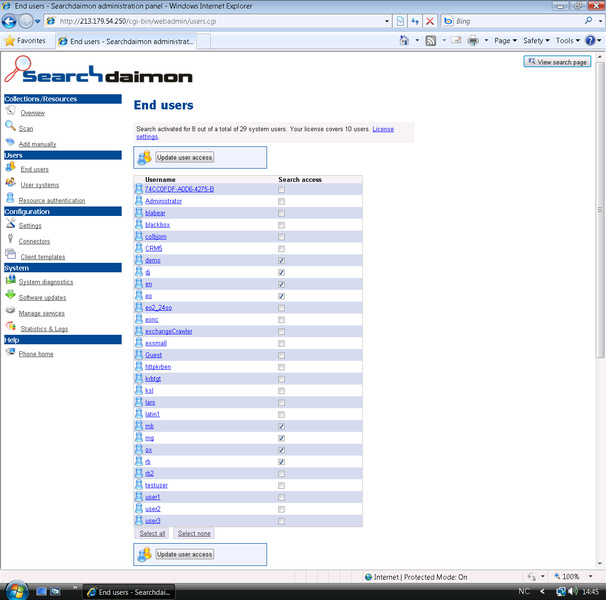
You have to active those users who should have access. Her you see the Under End users, all users in the primary user system are listed. Click on those users you want to activate, and remember to click "Update user access" when done.